
Meet Shiver — and the Next Era of Typing Agent
Introducing Blizzard Type Essentials: a faster, smarter, and more engaging keyboarding experience for your classroom
We’ve been quietly building something.
If you’ve been a Typing Agent school or district for a while, you already know what the platform can do. You’ve seen students move through the curriculum, improve their accuracy, build speed, and develop keyboard habits that will serve them for years. That hasn’t changed — and it isn’t going to.
But we think the experience of getting there deserves an upgrade.
Today, we’re excited to introduce Blizzard Type Essentials — the next evolution of Typing Agent — along with someone we think your students are going to love.
Say Hello to Shiver
Every great learning experience has a guide.
Shiver is Typing Agent’s first original character — a snowboarding Yeti with a big personality and an even bigger commitment to proper finger placement. He’s enthusiastic. He’s engaging. And he takes home row position very seriously.
Throughout Blizzard Type Essentials, Shiver appears in short instructional videos embedded directly into the lesson flow — teaching proper typing technique, correct finger placement, and healthy keyboard habits in a way that actually holds student attention. Not a distraction. An instructor.
For teachers, Shiver does the heavy lifting on technique explanation so you don’t have to. For students, he makes the process of learning to type feel like something worth paying attention to.
What Is Blizzard Type Essentials?

Blizzard Type Essentials is a refreshed take on the Typing Agent experience you know and trust, designed for grades 3 and above. It keeps the proven curriculum intact while introducing a cleaner interface, faster performance, and a more engaging classroom experience.
Simply put: the foundation stays strong—while everything around it gets even more exciting.
Here’s what’s new:
A Fresh Interface Built for Today’s Classrooms

The first thing you’ll notice is the look. The Blizzard interface brings a modern design update — cleaner visuals, easier navigation, and a layout that feels contemporary without abandoning the familiar structure teachers already know.
This matters more than it might seem. Students spend a lot of time inside this interface. A cluttered or dated experience creates friction. Blizzard reduces that friction so students can focus on what they’re actually here to do: learn to type.
Rebuilt for Chromebook Performance 🎉
We know Chromebooks are the backbone of most K–12 classrooms. We also know that platform performance on Chromebooks has historically been a pain point across a lot of classroom tools — including, at times, our own.
Blizzard Type Essentials was rebuilt from the ground up with Chromebook performance as a priority. Smoother sessions, faster load times, fewer interruptions. Less “it’s not working” and more actual practice time.
An Improved Typing Tutor
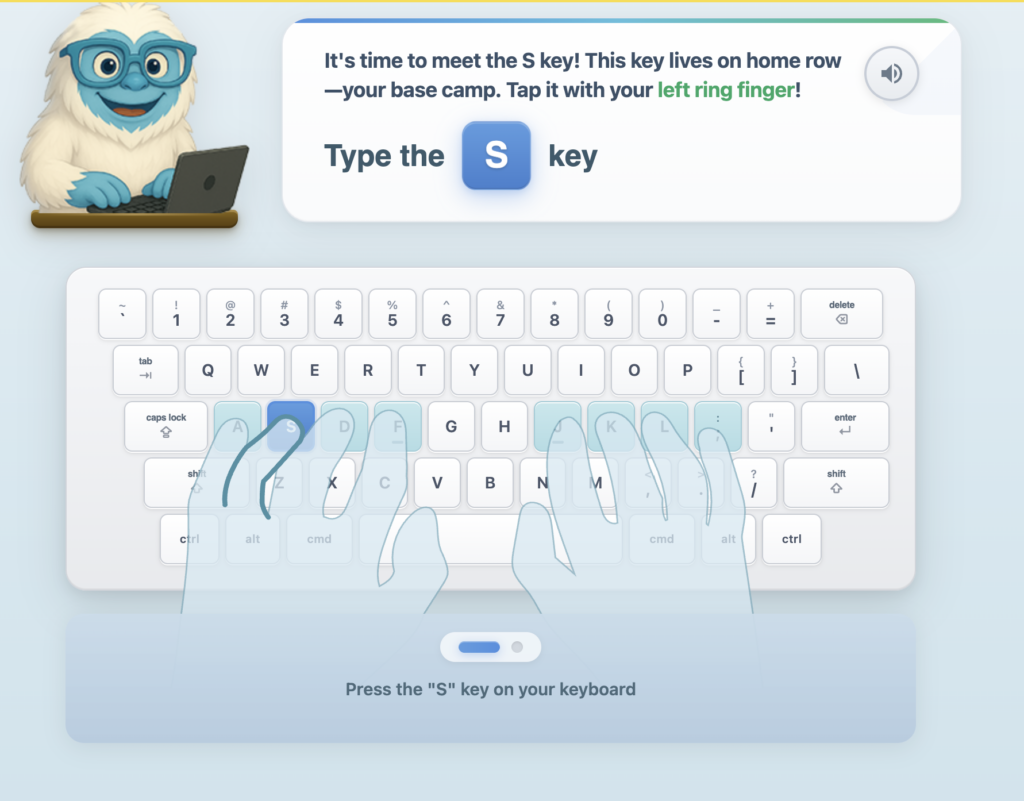
The core typing practice experience got a meaningful upgrade too. Cleaner visual feedback. Customizable backgrounds and cursors that let students make the experience feel like their own. Clearer, more immediate response to errors so students know exactly what to fix and when.
The goal is focus — removing the visual noise that pulls attention away from the keys.
Introducing SummitPath: Adaptive Learning That Actually Adapts

This is the part we’re most excited about.
SummitPath is Typing Agent’s new intelligent adaptive learning engine, and it works differently than anything we’ve built before.
Most keyboarding practice is uniform. Every student gets the same drills, the same sequences, the same word lists — regardless of where their actual gaps are. A student who struggles with “g” and “b” gets the same practice as a student who has those keys locked and is fighting with punctuation.
SummitPath fixes that.
The engine watches every keystroke. It identifies which keys each student struggles with most, which letter combinations slow them down, and where their accuracy is weakest. Then it rebuilds the next practice session around exactly those gaps.
Every session follows a three-phase structure:
Trail Warm-Up — Short, high-confidence bursts designed to activate muscle memory and build momentum before the harder work begins.
Precision Climb — Targeted drills weighted toward each student’s problem keys. If a student is hitting “g” at 58% accuracy, words containing “g” will appear three times more often in this phase. The practice goes where the need is.
Summit Run — Full-speed sentences with key-targeted content, grade-appropriate vocabulary, and punctuation practice. This is where the work from the first two phases gets applied.
SummitPath also includes a set of smart supporting features:
- Grade-scaled difficulty — K–2 pacing is forgiving and confidence-building. Grades 6–8 require consistent rhythm and accuracy.
- Frost Freeze — Pauses input after consecutive errors to interrupt the panic-mashing pattern that reinforces bad habits instead of correcting them.
- Slow Mode — One word at a time for students who need to prioritize accuracy over speed.
- Ghost Cursor — Displays a student’s own previous WPM as a reference point. Not a race against anyone else. Just awareness of their own growth.
Over time, SummitPath systematically closes gaps. Weak keys get heavy practice. Mastered keys fade into the background. The result is faster, more efficient skill-building — personalized to each student without requiring any extra setup from teachers.
No two sessions are the same. Every practice session is built around where the student actually is right now.
What Doesn’t Change
We want to be clear about this: the classic Typing Agent experience isn’t changing anytime soon.
From now until the end of school year 2026-27, teachers and administrators who have built curriculum workflows around the platform can continue using it exactly as they do today. Blizzard Type Essentials is available as an assignable option within the existing platform — not a replacement, not a forced migration.
If you want to add Blizzard Type Essentials as a supplemental activity, you can. If you want to make it your primary typing curriculum, you can do that too. If you want to wait and see, the option will be there when you’re ready.
After 2027, Blizzard Type will become the standard typing instruction engine in Typing Agent. We love it, and know you will too.
Try the Beta Free — Right Now
Blizzard Type Essentials is in Beta today, and every current Typing Agent school and district has free access through our official summer release.
Getting started takes about thirty seconds:
- Have your teacher or school admin log into Typing Agent
- Navigate to the Curriculum tab
- Find Blizzard Type Essentials
- Click Assign
That’s it. Shiver takes it from there.
We’re actively building during this Beta phase and we genuinely want your feedback. If you run into bugs, have feature requests, or just want to tell us what your students think of Shiver, reach out anytime via in-app chat or at support@typingagent.com.
The Blizzard Era Starts Now
Blizzard Type Essentials is the beginning of something bigger — a new era for Typing Agent that combines the curriculum foundation schools have trusted with the kind of modern, adaptive, character-rich experience students respond to.
Shiver is ready. Your students are ready.